
JavaScript Guide
The baselode npm package provides data loading, desurveying, 2D strip-log visualisation, and a 3D scene renderer for drillhole and spatial datasets.
Requires: Node.js 18+ · peer dependencies: React 18+, Three.js, Plotly, PapaParse
npm install baselodeSpatial extents
Extent is the shared bounds-and-CRS primitive for map requests, spatial filters, and GeoJSON study areas. Import it from the lightweight subpath when you do not need the rest of Baselode:
import { Extent } from 'baselode/extent';

const area = Extent.fromBbox(
  { west: 120, south: -32, east: 120.5, north: -31.5 },
  'EPSG:4326',
  'study area',
);

const mga = area.toCrs('EPSG:28351');
const [longitude, latitude] = mga.center({ lonlat: true });
const feature = mga.toFeature({ purpose: 'drillhole-filter' });
The constructor also accepts named bounds:
const area = new Extent({
  xmin: 120,
  ymin: -32,
  xmax: 120.5,
  ymax: -31.5,
  crs: 4326,
});
Bounds and name are immutable. setCrs(crs) changes only the CRS label and is chainable; use toCrs(crs) when the coordinates must be reprojected. EPSG strings/numbers and proj4-compatible proj/WKT definitions are accepted. Built-in definitions cover WGS84, Web Mercator, GDA94, and MGA zones 49–58. Unknown CRS codes fail with an explicit error.
toPolygon(), toFeature(properties), and toFeatureCollection(properties) emit deterministic GeoJSON using the ring order southwest → southeast → northeast → northwest → southwest.
Peer Dependencies
baselode relies on the following peer dependencies, which must be installed in your application:
npm install react react-dom three three-viewport-gizmo plotly.js-dist-min papaparse3D sections and slabs
SectionHelper provides an orthographic vertical cross-section aligned to X or Y. SliceHelper retains a finite, movable slab around an X or Y plane. Both operate on a Baselode3DScene, retain clipping planes supplied by the host application, and are mutually exclusive.
import { SectionHelper, SliceHelper } from 'baselode';

const section = new SectionHelper(scene).enable('x', 250);
section.setPosition(275);
section.disable();

const slab = new SliceHelper(scene).enable('y', 500, 25);
slab.setWidth(40);
slab.step(10);
slab.disable();
The demo’s Block Model and Drillhole pages include controls for both modes. Freehand knife-line slicing is intentionally not part of this API yet.
Data Model
The JavaScript package exposes the same Baselode Open Data Model constants as the Python package.
import {
  HOLE_ID, LATITUDE, LONGITUDE, ELEVATION,
  AZIMUTH, DIP, FROM, TO, MID, DEPTH,
  EASTING, NORTHING, CRS,
  BASELODE_DATA_MODEL_DRILL_COLLAR,
  BASELODE_DATA_MODEL_DRILL_SURVEY,
  BASELODE_DATA_MODEL_DRILL_ASSAY,
  DEFAULT_COLUMN_MAP
} from 'baselode';
Column standardization
Like the Python loaders, the JS column utilities normalise source field names to the Baselode data model.
import { standardizeColumns, normalizeFieldName } from 'baselode';

const normalised = standardizeColumns(rawRows);
// e.g. "HoleId" → "hole_id", "RL" → "elevation"
Data Loading
Collars, surveys, and assays
import { loadCollars, loadSurveys, loadAssays, assembleDataset } from 'baselode';

// Accepts a CSV text string or an array of row objects
const collars  = loadCollars(collarsText);
const surveys  = loadSurveys(surveysText);
const assays   = loadAssays(assaysText);

const dataset = assembleDataset({ collars, surveys, assays });
Already-parsed rows
When another decoder has already produced row objects—for example Parquet, Arrow, LAS, or a database query—pass those rows directly instead of converting them to CSV:
import {
  parseAssaysFromRows,
  parseStructuralFromRows,
  parseUnifiedDatasetFromRows,
} from 'baselode';

const assays = parseAssaysFromRows(parquetAssayRows);
const structural = parseStructuralFromRows(parquetStructuralRows);
const unified = parseUnifiedDatasetFromRows({
  assayRows: parquetAssayRows,
  structuralRows: parquetStructuralRows,
  geologyRows: parquetGeologyRows,
});
Row entry points are synchronous and do not mutate their inputs. They avoid a rows → CSV → rows round trip and preserve typed extra values. Existing CSV functions remain available as adapters. Assay CSV scans continue to use PapaParse incrementally for large files.
The specialized row APIs are parseAssayHoleIdsFromRows, parseAssayHoleIdsWithAssaysFromRows, parseAssayHoleFromRows, parseAssaysFromRows, loadAssayFromRows, parseSurveyFromRows, parseDrillholesFromRows, parseBlockModelFromRows, parseStructuralPointsFromRows, parseStructuralIntervalsFromRows, parseStructuralFromRows, parseAssayHolesFromRows, parseGeologyFromRows, parseUnifiedDatasetFromRows, and parseGeophysicsFromRows. The higher-level loadTable, loadCollars, loadSurveys, loadAssays, and loadGeology APIs also accept row arrays.
Assay-focused loaders
For large assay CSVs with multiple analyte columns:
import { loadAssayFile, loadAssayHole, buildAssayState } from 'baselode';

// Load metadata (hole IDs + column names) without parsing all rows
const meta = await loadAssayMetadata(csvText);

// Load assay data for a specific hole
const holeData = loadAssayHole(csvText, 'HOLE_001');
Structural data
import { parseStructuralPointsCSV, parseStructuralCSV } from 'baselode';

const structuralPoints = parseStructuralPointsCSV(csvText);
// Returns an array of { hole_id, depth, dip, azimuth, alpha, beta, comments }
Block model
import { parseBlockModelCSV, getBlockStats, filterBlocks } from 'baselode';

const blocks = parseBlockModelCSV(csvText);
const stats  = getBlockStats(blocks, 'au_ppm');
const subset = filterBlocks(blocks, { property: 'au_ppm', min: 1.0 });
Polygonal grade blocks
Grade blocks are closed polyhedral meshes — grade shells, geologic domains, or any volumetric solid defined by triangulated vertices. They are loaded from a structured JSON format:
import { loadGradeBlocksFromJson, addGradeBlocksToScene } from 'baselode';

// Parse and validate the JSON (accepts a parsed object or a JSON string)
const blockSet = loadGradeBlocksFromJson(json);

// Render into an existing THREE.Scene (e.g. from Baselode3DScene)
const group = addGradeBlocksToScene(scene.scene, blockSet);
// Returns a THREE.Group whose children are one THREE.Mesh per block
JSON schema (version "1.0")
{
  "schema_version": "1.0",
  "units": "m",
  "blocks": [
    {
      "id": "HG",
      "name": "High grade",
      "vertices": [[0,0,0], [10,0,0], [10,10,0], [0,10,0],
                   [0,0,5], [10,0,5], [10,10,5], [0,10,5]],
      "triangles": [[0,1,2],[0,2,3], [4,5,6],[4,6,7],
                    [0,1,5],[0,5,4], [1,2,6],[1,6,5],
                    [2,3,7],[2,7,6], [3,0,4],[3,4,7]],
      "attributes": { "grade_class": "HG", "au_ppm": 4.2 },
      "material": { "color": "#B02020", "opacity": 1.0 }
    }
  ]
}| Field | Required | Description |
|---|---|---|
schema_version | yes | Must be "1.0" |
units | no | Coordinate units string (e.g. "m") |
blocks[].id | yes | Unique identifier |
blocks[].name | yes | Display name |
blocks[].vertices | yes | [[x,y,z], ...] array of 3-D vertex positions |
blocks[].triangles | yes | [[i,j,k], ...] zero-based triangle index triples |
blocks[].attributes | no | Arbitrary key-value metadata shown in selection panel |
blocks[].material.color | no | CSS hex colour (default #888888) |
blocks[].material.opacity | no | 0–1 opacity (default 1.0) |
Unified dataset (assays + structural)
import { parseUnifiedDataset } from 'baselode';

const unified = parseUnifiedDataset(assaysCsvText, structuralCsvText);
// Returns a combined array with a `_source` tag ('assay' | 'structural')
Desurveying
Canonical minimum-curvature desurvey
import { minimumCurvatureDesurvey } from 'baselode';

const traces = minimumCurvatureDesurvey(
  [{ hole_id: 'DH001', easting: 500000, northing: 6900000, elevation: 300 }],
  [
    { hole_id: 'DH001', depth: 0, azimuth: 90, dip: -60 },
    { hole_id: 'DH001', depth: 100, azimuth: 90, dip: -60 }
  ],
  { step: 1 }
);
// Flat trace rows with x/y/z scene aliases plus easting/northing/elevation.
// X is east, Y is north, and elevation is +Z up.
Low-level desurvey methods
import {
  minimumCurvatureDesurvey,
  tangentialDesurvey,
  balancedTangentialDesurvey,
  midpointTangentialDesurvey,
  buildTraces
} from 'baselode';

// minimumCurvatureDesurvey is the industry standard (default);
// midpointTangentialDesurvey is Vulcan's default "Tangent" for like-for-like comparisons.
const trace = minimumCurvatureDesurvey(collarRows, surveyRows, { step: 1.0 });
Every trace starts at the collar (md = 0): a first station below the collar has its orientation extended straight up, matching Vulcan / Surpac and the Python package.
Attaching assay positions to 3D traces
import { attachAssayPositions } from 'baselode';

const assaysWithXYZ = attachAssayPositions(assayRows, traces);
// Adds { x, y, z } to each assay row by interpolating the trace
Interpolating the trace at arbitrary depths
import { interpolateTrajectory } from 'baselode';

const positions = interpolateTrajectory(traces, { 'DH001': [47.3, 52.1] });
// → [
//   { hole_id: 'DH001', depth: 47.3, x, y, z, azimuth, dip },
//   { hole_id: 'DH001', depth: 52.1, x, y, z, azimuth, dip },
// ]
Linear interpolation per coordinate. Mirrors the Python interpolate_trajectory. depths accepts a number, number[], {hole_id: [...]}, or [{hole_id, depth}, ...]. Out-of-range depths (and unknown holes) return rows with null in every output field except hole_id and depth.
DrillholeSet — the composition root
DrillholeSet bundles collar + survey + N named interval tables into one object, mirroring the Python class. Methods delegate to the existing function-based API.
import { DrillholeSet } from 'baselode';

const db = new DrillholeSet(collarRows, surveyRows, {
  crs: 'EPSG:32750',
  project: 'goldfields-2026',
});

db.addTable('assay', assayRows)
  .addTable('geology', lithoRows, 'litho');

const report = db.validate();
const traces = db.desurvey({ method: 'minimum_curvature', step: 1 });
OMF export (db.to_omf in Python) is intentionally Python-only; the JS class focuses on the in-memory validate/desurvey path.
Database validation
validateDrillholeDb mirrors the Python validator, returning a structured { summary, issues } report covering every check in one pass.
import {
  validateDrillholeDb,
  fixSingleStationSurveys,
  normalizeAzimuth,
  dropOrphanIntervals,
  swapInvertedIntervals,
  replaceBelowDetectionLimit,
} from 'baselode';

const report = validateDrillholeDb({
  collar: collarRows,
  survey: surveyRows,
  intervalTables: { assay: assayRows, geology: lithoRows },
});

const errors = report.issues.filter((issue) => issue.severity === 'error');
Checks covered (severity, what triggers): duplicate_hole_ids (error), survey_null_orientation (error — a row's depth / azimuth / dip is null or non-numeric, so desurvey ignores it), survey_no_usable_stations (warning — a hole has no usable row and drops out of the desurvey), single_station_surveys (warning, usable rows only), azimuth_range / dip_range (error), orphan_intervals (error), negative_lengths (error), intervals_beyond_max_depth (warning), interval_gaps (info), interval_overlaps (warning), below_detection_limit (info).
Fix helpers
const surveyUsable   = dropUnusableSurveyRows(surveyRows);            // null / non-numeric depth, azimuth, dip
const { survey: surveyRebuilt, report } = synthesiseCollarStation(surveyUsable, collarRows);  // collar station for holes with none
const surveyFixed    = fixSingleStationSurveys(surveyRebuilt, collarRows);
const surveyWrapped  = normalizeAzimuth(surveyRows);  // 360 → 0, -30 → 330, idempotent
const assaysMatched  = dropOrphanIntervals(assayRows, collarRows);
const assaysSwapped  = swapInvertedIntervals(assayRows);  // fixes to<from typos
const assaysClean    = replaceBelowDetectionLimit(assayRows, { columns: ['au_ppm'] });
All helpers return new arrays — the source rows are untouched.
To treat azimuth = 360 as valid without normalizing first, pass allowFullCircle: true:
const report = validateDrillholeDb({ collar, survey }, { allowFullCircle: true });Interval algebra
Pure from-to primitives that mirror the Python baselode.drill.intervals module. Each function takes an array of row objects keyed by hole_id, from, to — the same shape your loaders already produce.
import {
  intervalLength,
  fromToMidpoints,
  detectGaps,
  detectOverlaps,
  splitAt,
  clip,
  mergeTables,
} from 'baselode';
QC checks: gaps and overlaps
const gaps     = detectGaps(assayRows, { minGap: 0.5 });
const overlaps = detectOverlaps(assayRows);
// gaps:     [{ hole_id, from, to, length }, ...]
// overlaps: [{ hole_id, from, to, length, first_index, second_index }, ...]
first_index / second_index are positional indices into the input array.
Splitting at boundaries
// per-hole boundaries
const splitByHole = splitAt(assayRows, { DH001: [12.5, 47.0] });

// or as a row array (handy when the boundaries come straight from a CSV)
const splitByRows = splitAt(assayRows, [
  { hole_id: 'DH001', depth: 12.5 },
  { hole_id: 'DH001', depth: 47.0 },
]);

// or broadcast a single list to every hole
const splitAll = splitAt(assayRows, [50, 100]);
Each straddling row is replaced by sub-intervals that inherit all other fields.
Clipping to a depth window
const top200m = clip(assayRows, 0, 200);Intervals entirely outside [fromDepth, toDepth] are dropped; straddling intervals are pulled to the boundary. Pass null for either bound to disable that side.
Merging interval tables onto a common support
const merged = mergeTables({ assay: assayRows, litho: lithoRows });
// each row: { hole_id, from, to, assay_<col>, ..., litho_<col>, ... }
The first table in the object is the "left" — only depth ranges it covers appear in the output. Each subsequent table's columns are looked up at the sub-interval midpoint and prefixed by table name (or null when no covering row exists).
Per-row helpers
const lengths = intervalLength(assayRows);    // number[]
const mids    = fromToMidpoints(assayRows);   // number[]
3D Interpolation Volumes
baselode ships a small GPU-rendered IDW (inverse-distance-weighted) interpolation volume — the kind of "fuzzy 3D heatmap" you want for a quick look at how a drilling attribute (Au grade, alteration index, anything numeric) varies between sample points before committing to a full block model.
The stack composes four primitives so each piece is reusable on its own:
| Piece | What it does |
|---|---|
buildInterpSamplesFromAssays(rows, attribute) | Convert assay-interval rows (with desurveyed x/y/z or collar-vertical fallback) into { id, x, y, z, value } sample points |
computeVolumeBounds(points, padding) | Auto-compute an axis-aligned bbox from a sample set, with optional uniform world-unit padding |
IDWSampler(samples, opts) | Pure scalar-field sampler: getValueAt(x, y, z) returns the IDW-interpolated value. Backed by SpatialHash3D for fast radius queries |
buildVoxelGrid(sampler, bounds, dims) | Walk the sampler across a regular voxel grid; returns { values: Float32Array, nodataMask: Uint8Array, dims, voxelSize, bounds } |
IDWVolumeRenderer | Three.js shader-based volume renderer; uploads the voxel grid as a Data3DTexture and ray-marches it inside a bounding box |
IDWVolumeLayer | One-call wrapper that does all of the above and exposes a Three.Object3D for the scene |
Single-call workflow
import {
  IDWVolumeLayer,
  buildInterpSamplesFromAssays,
} from 'baselode';

const samples = buildInterpSamplesFromAssays(assayRowsWithPositions, 'au_ppm');

const layer = new IDWVolumeLayer({
  samples,
  idw:        { power: 2, searchRadius: 60, maxNeighbors: 8 },
  grid:       { dims: [64, 64, 64] },   // or { voxelSize: [10, 10, 10] }
  displayMin: 0,
  displayMax: 5,
  opacity:    0.6,
  threshold:  0.15,   // normalised [0,1] cutoff; null disables
  blockMode:  true,   // crisp voxel-blocks vs smooth trilinear blend
});

await layer.rebuild();
scene.add(layer.object3D);

// Display-only knobs — no rebuild required
layer.setOpacity(0.4);
layer.setThreshold(0.3);
layer.setBlockMode(false);

// Axis-aligned slice planes (per-axis bounds in [0,1] box-local space)
layer.setClipBounds([0, 0, 0], [1, 1, 0.6]);  // slice off the top 40% of Z

// Cleanup
scene.remove(layer.object3D);
layer.dispose();
How the rendering works
IDWVolumeRenderer ray-marches a Three.js box mesh in a custom GLSL 3 fragment shader. Each ray:
- Intersects the AABB clipped to the current
[uClipMin, uClipMax]sub-box. - Steps through the volume (default 64–96 samples per ray).
- Samples a
Data3DTextureat each step.blockMode=truesnaps to voxel centres for the crisp block-model look;falselets the GPU's trilinear filter smooth between voxels. - Composites front-to-back with the active transfer function (blue→red by default; override via
colorLow/colorHigh). - Writes
gl_FragDepthat the first significant ray hit, so opaque objects placed inside the volume (sample-point markers, drillhole traces, etc.) get correctly occluded when they sit behind the visible voxel surface and stay visible when they sit in front.
Performance guidance
buildVoxelGrid runs an async build that yields to the event loop every 4096 voxels by default — UIs stay responsive while a grid evaluates. Pass { sync: true } from inside a Web Worker.
Memory cost (Float32 values + Uint8 no-data mask):
| Grid | Bytes | Notes |
|---|---|---|
| 32³ | ~165 KB | Quick preview |
| 64³ | ~1.3 MB | Comfortable for routine viewing |
| 128³ | ~10 MB | Good for hi-detail; rebuild is noticeable |
| 256³ | ~85 MB | Use with care |
Cancellation tokens are honoured ({ cancellationToken: { cancelled: false } }) so an in-flight rebuild can be aborted when the user nudges a parameter.
Comparison to a full block-model estimator
This is a visualisation primitive, not a resource estimator. Use it when you want to look at the field; reach for kriging / pyGSLIB when you need to report it.
IDWVolumeLayer | BlockModel | |
|---|---|---|
| Run on the fly | ✓ | ✗ (pre-computed CSV) |
| Tweakable interactively (power / radius / threshold) | ✓ | ✗ |
| Anisotropic / geological-domain aware | ✗ | ✓ |
| Estimator validation / variography | ✗ | ✓ (via external tools) |
| Memory footprint | <100 MB | scales with rows |
Compositing
compositeIntervals mirrors the Python composite_intervals soft + hard boundary modes. True-thickness compositing is Python-only because it needs a desurveyed trace; for browser-side workflows that need true-thickness, do the composite step server-side and ship the result to the client.
import { compositeIntervals } from 'baselode';

// Soft mode (default): fixed-length bins across each hole, length-weighted average
const composites = compositeIntervals(assayRows, 'au_ppm', { length: 2 });

// Hard-boundary by domain — composites reset at every change in the boundary column
const byLitho = compositeIntervals(assayRows, 'au_ppm', {
  length: 2,
  mode: 'hard',
  boundaryCol: 'lithology',
  residual: 'distribute',  // or 'discard' (default) / 'add_to_previous'
});
Options:
| Option | Type | Default | Meaning |
|---|---|---|---|
length | number | 1 | Composite length (must be a positive finite number) |
method | 'average' | 'sum' | 'average' | Length-weighted average or sum |
mode | 'soft' | 'hard' | 'soft' | Boundary handling |
boundaryCol | string | — | Domain column for hard mode (required when mode === 'hard') |
residual | 'discard' | 'add_to_previous' | 'distribute' | 'discard' | Tail-of-domain handling for hard mode |
fromCol / toCol / holeCol | string | 'from' / 'to' / 'hole_id' | Column-name overrides |
Both length and method are validated up front — passing 0, NaN or Infinity for length, or an unknown method, throws with a clear message.
Visualization
Column classification
baselode classifies columns automatically for the strip-log renderer:
import { classifyColumns, DISPLAY_NUMERIC, DISPLAY_CATEGORICAL, DISPLAY_COMMENT, DISPLAY_TADPOLE } from 'baselode';

const classification = classifyColumns(rows);
// Returns { colName: DISPLAY_NUMERIC | DISPLAY_CATEGORICAL | DISPLAY_COMMENT | DISPLAY_TADPOLE | DISPLAY_HIDDEN }
2D strip log (Plotly)
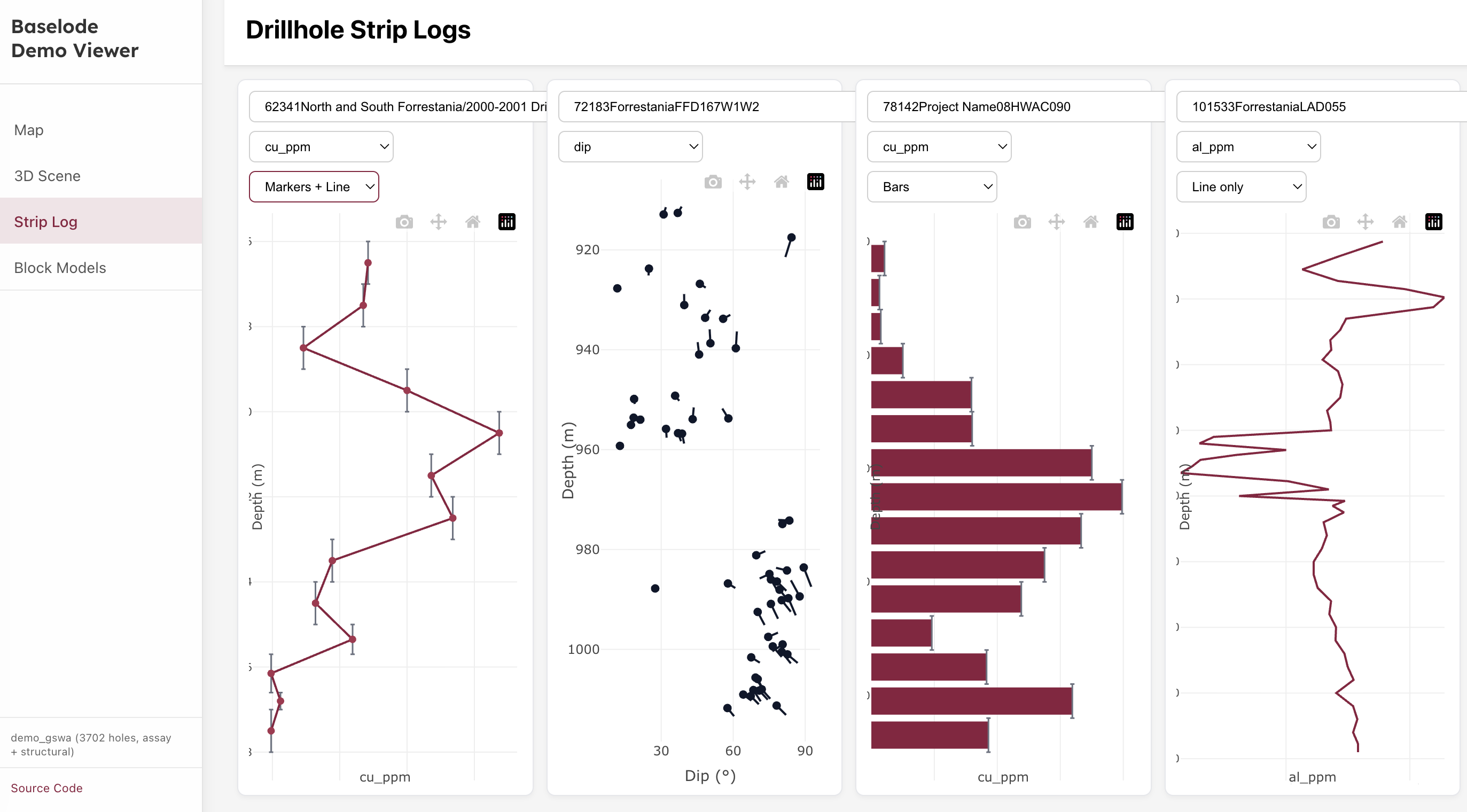
import { buildIntervalPoints, buildPlotConfig, getChartOptions, defaultChartType } from 'baselode';

const points     = buildIntervalPoints(holeRows, 'au_ppm');
const chartType  = defaultChartType('au_ppm', holeRows);
const config     = buildPlotConfig(points, 'au_ppm', { chartType });

Plotly.newPlot('container', config.data, config.layout);
Numeric chart types
Numeric tracks support bar, markers, markers+line, line, colored-line (value-graded markers), multi-line / multi-stacked (several assays in one track), plus five specialist displays:
| Chart type | Display |
|---|---|
filled-line | Line with the area between the curve and x = 0 shaded in the series colour |
step-line | One vertex pair per interval — blocked/composited assays render their true extents |
heat-strip | Full-track-width bars coloured by value on the assay ramp, with a slim colour bar |
two-curve | Two curves with the band between them shaded, flipping colour at each crossover |
composition | Divided horizontal stacked bars per interval — components as fractions of their sum |
two-curve and composition are multi-property chart types: like multi-line / multi-stacked they consume the multi-property selection (TracePlot's assay multi-select, multiProps in the tool-ui schema) and route through buildPlotConfig's series option. two-curve uses the first two selected series (extras are ignored; fewer than two renders an empty track); composition stacks every selection.
The other display types each offer an alternative chart type in the same dropdowns: categorical columns add point-log, comment columns add annotations, and structural (tadpole) tracks add dip-azimuth — all backed by the structural builders below.
Pass logScale: true to put the value axis on a log scale (applies to bar, markers, markers+line, line, filled-line and step-line; ignored for other chart types):
const config = buildPlotConfig({
  points,
  isCategorical: false,
  property: 'au_ppm',
  chartType: 'step-line',
  logScale: true,
});
Two-curve fill (cross-plot track)
The low-level buildTwoCurveFillConfig builder (the two-curve chart type uses the same implementation) overlays two numeric curves and shades the region between them, flipping colour exactly at each crossover — the classic neutron–density display:
import { buildTwoCurveFillConfig } from 'baselode';

const config = buildTwoCurveFillConfig({
  hole,                      // { id, points: [...] }
  propertyA: 'density',
  propertyB: 'neutron',
  colorA: '#e15759',         // optional; defaults to commodity colour / colorway
  colorB: '#4e79a7',
  logScale: false,
});
Where A > B the band is colour A at alpha 0.4; where B > A it is colour B.
Percent-composition track
buildCompositionConfig (the low-level API behind the composition chart type) renders divided horizontal stacked bars per interval (e.g. sand/silt/clay fractions):
import { buildCompositionConfig } from 'baselode';

const config = buildCompositionConfig({
  hole,
  properties: ['sand', 'silt', 'clay'],  // stack + legend order
  normalize: true,                       // fractions of each interval's sum (default)
});
With normalize the x-axis is fixed to [0, 1], titled "Fraction" and formatted as percentages. Intervals whose components are all null/zero are skipped; negative values are clamped to 0 for the bar while the raw value stays in the hover.
Structural logs
Beyond the tadpole log, three structural track builders are available. Each also backs a chart type in the strip-log dropdowns: point-log (categorical columns), annotations (comment columns) and dip-azimuth (structural tracks).
import {
  buildPointLogConfig,
  buildDepthAnnotationsConfig,
  buildDipAzimuthConfig,
  alphaBetaToDipAzimuth,
} from 'baselode';

// Categorical point measurements: one x slot / colour / symbol per category.
const pointLog = buildPointLogConfig({ rows: structuralRows, categoryKey: 'defect' });

// Depth-pinned free text (truncated to ~40 chars, full text in hover).
const annotations = buildDepthAnnotationsConfig({ rows: structuralRows, textKey: 'comments' });

// Split dip / azimuth tracks: dip fixed [0, 90], azimuth fixed [0, 360].
const dipAzimuth = buildDipAzimuthConfig({ rows: structuralRows, colorBy: 'defect' });

// Oriented-core alpha/beta → true dip / dip direction (scalars or arrays).
const { dip, dipDirection } = alphaBetaToDipAzimuth(-60, 45, 30, 120);
alphaBetaToDipAzimuth follows the survey convention (holeDip negative = downward); beta is measured clockwise looking downhole from the bottom-of-hole line, or from north for near-vertical holes. The implementation is reference-tested against the Python alpha_beta_to_dip_azimuth.
React component — TracePlot
TracePlot renders a complete multi-track Plotly strip log for a single hole.
import { TracePlot } from 'baselode';

<TracePlot
  rows={holeRows}
  properties={['au_ppm', 'lithology', 'alpha']}
/>
TracePlot also accepts an optional propertyMeta map ({ [property]: { label?, unit?, sourceAttribute? } }). When the selected property has an entry, its unit / source attribute are folded into the axis title, hover tooltip and property dropdown — e.g. a column keyed Au renders as Au (ppm) — while selection and onConfigChange keep using the bare property key.
React hook — useDrillholeTraceGrid
For building full drill-hole comparison grids:
import { useDrillholeTraceGrid } from 'baselode';

function MyGrid({ holes, selectedProperty }) {
  const { plots } = useDrillholeTraceGrid({ holes, property: selectedProperty });
  return <div className="grid">{plots.map(p => <TracePlot key={p.holeId} {...p} />)}</div>;
}
Tool UI
Baselode publishes the complete contract needed to render structured visualisation results in a new assistant-ui chat. The package owns the schemas, React components, canonical tool names, state handling, and assistant-ui renderer registration; applications only need to align their backend tool names and return the documented JSON result.
npm install baselode @assistant-ui/react @assistant-ui/react-ai-sdk zodbaselode/assistant-ui and baselode/tool-ui are client entries. Import them from a client component and import the stylesheet once. Server-only code should use the SSR-safe baselode/tool-ui/contracts entry.
Register the renderer toolkit
The adapter uses assistant-ui's current defineToolkit/Tools contract. It creates renderer-only backend entries: your chat backend still owns tool descriptions, parameters, execution, and the returned result.
'use client';

import {
  AssistantRuntimeProvider,
  Tools,
  useAui,
} from '@assistant-ui/react';
import { AssistantChatTransport, useChatRuntime } from '@assistant-ui/react-ai-sdk';
import { createBaselodeAssistantUiToolkit } from 'baselode/assistant-ui';
import 'baselode/tool-ui/style.css';

const baselodeToolkit = createBaselodeAssistantUiToolkit({
  // Map primitive kinds to the exact tool names emitted by your backend.
  // Omit this option if the backend uses Baselode's canonical names.
  toolNames: {
    'strip-log': 'show_strip_log',
    'scatter-plot': 'plot_assays',
  },
  onEvent(event) {
    // Strip-log property, track, interval, and depth-range interactions arrive
    // here with kind, toolName, toolCallId, type, and payload.
    console.log(event);
  },
});

export default function App() {
  const runtime = useChatRuntime({
    transport: new AssistantChatTransport({ api: '/api/chat' }),
  });
  const aui = useAui({ tools: Tools({ toolkit: baselodeToolkit }) });

  return (
    <AssistantRuntimeProvider runtime={runtime} aui={aui}>
      {/* assistant-ui thread */}
    </AssistantRuntimeProvider>
  );
}
The canonical names are baselode_strip_log, baselode_3d_scene, baselode_scatter_plot, baselode_histogram_plot, baselode_box_plot, baselode_violin_plot, and baselode_ternary_plot. Alias only the primitives your backend names differently. Names must be unique.
By default the adapter validates part.result. Use payloadSource: 'args' only when a frontend tool puts the complete visualisation payload in its arguments. It renders accessible states for running, approval-required, incomplete, backend error, empty, invalid, and component-render failures. A custom renderState or onRenderError can integrate those states with application chrome. Invalid payloads retain their Zod issue paths under “Contract details”.
Return a schema-valid result
For example, show_strip_log should return this compact JSON object as its tool result (not nest it under another data or result property):
{
  id: 'strip-log-BLDD001',
  hole: {
    id: 'BLDD001',
    points: [
      { from: 0, to: 12, au_ppm: 0.11, lithology: 'SAP' },
      { from: 12, to: 24, au_ppm: 0.35, lithology: 'BAS' },
    ],
  },
  tracks: [
    { property: 'au_ppm', label: 'Au ppm', displayType: 'numeric' },
    { property: 'lithology', label: 'Lithology', displayType: 'categorical' },
  ],
}
Backend code can validate results without evaluating the browser-only React, Plotly, and Three.js implementations:
import {
  BASELODE_TOOL_UI_SCHEMA_CONTRACTS,
  BASELODE_TOOL_UI_TOOL_NAMES,
  getBaselodeToolUiSchemaContractByToolName,
  parseBaselodeToolUiResult,
} from 'baselode/tool-ui/contracts';

const parsed = parseBaselodeToolUiResult('strip-log', toolResult);
if (!parsed.success) {
  throw parsed.error; // Includes precise property paths and messages.
}
Each registry record exposes kind, toolName, schema, callbacks, styles, and peerDependencies. The browser entry baselode/tool-ui adds the corresponding Component and exports the same registry as BASELODE_TOOL_UI_CONTRACTS, which is useful when integrating a framework other than assistant-ui.
Numeric tracks accept any of the numeric chart types (including filled-line, step-line, heat-strip and the multi-property two-curve / composition) plus an optional logScale: true; categorical tracks accept point-log as an alternative to the bands, and usePatterns: true to hatch the bands with the built-in lithology pattern map.
Per-property unit metadata
BaselodeStripLogToolUI accepts an optional propertyMeta map that attaches a value unit and raw source attribute to each property. The formatted label (Au (ppm), or Au (ppm, source: Au_ppb) when the source attribute differs from the display label — i.e. meta.label if provided, otherwise the bare property key) is then applied to the property selector, the track header, the axis title and the hover tooltip — selection identity and track.property still use the bare property key.
<BaselodeStripLogToolUI
  // ...
  propertyOptions={['Au', 'Cu', 'Ni']}
  propertyMeta={{
    Au: { unit: 'ppm', sourceAttribute: 'Au_ppb' },
    Cu: { unit: 'ppm', sourceAttribute: 'Cu_ppm' },
    Ni: { unit: '%' },
  }}
/>
Each entry is { label?, unit?, sourceAttribute? }. The source attribute is omitted from the display when it matches the label. propertyMeta is optional and may be partial — missing keys fall back to the bare property name.
Pass deriveMetaFromRows to back-fill metadata for keys absent from propertyMeta directly from the rows' analysis_uom / analyte_attribute columns (a unanimous value across a property's rows is adopted; a mixed set is ignored). With neither prop supplied, output is identical to the pre-metadata behaviour.
The baselode/tool-ui entry exports:
import {
  BaselodeStripLogToolUI,
  Baselode3DSceneToolUI,
  SerializableBaselodeStripLogSchema,
  SerializableBaselode3DSceneSchema,
  safeParseSerializableBaselodeStripLog,
  safeParseSerializableBaselode3DScene,
  BASELODE_TOOL_UI_CONTRACTS,
  BASELODE_TOOL_UI_TOOL_NAMES,
  parseBaselodeToolUiResult,
} from 'baselode/tool-ui';
Theming Tool UI chrome
Plotly-rendered strip logs use the selected Baselode Plotly template. The surrounding Tool UI chrome, including headers, controls, legends, error states, and 3D scene frames, uses CSS custom properties derived from the same Baselode light and dark palettes.
BaselodeStripLogToolUI uses light chrome by default and switches to dark chrome when template="baselode-dark". Baselode3DSceneToolUI uses light chrome by default and switches to dark chrome when background="black".
Override the CSS variables on a parent container when your app needs to theme Tool UI elements that Plotly templates do not cover:
.my-assistant-theme .baselode-tool-strip-log,
.my-assistant-theme .baselode-tool-3d-scene {
  --baselode-tool-bg: #ffffff;
  --baselode-tool-panel: #f8fafc;
  --baselode-tool-ink: #1e293b;
  --baselode-tool-ink-soft: #64748b;
  --baselode-tool-grid: #e8e8e8;
  --baselode-tool-line: #d0d0d0;
  --baselode-tool-accent: #f59e0b;
  --baselode-tool-muted-1: #94a3b8;
  --baselode-tool-muted-2: #cbd5e1;
  --baselode-tool-muted-3: #e2e8f0;
  --baselode-tool-primary: #8b1e3f;
}
Plotly templates
Baselode ships two built-in Plotly templates that can be applied to any strip log.
| Export | Appearance |
|---|---|
BASELODE_TEMPLATE / BASELODE_LIGHT_TEMPLATE | White background, Inter font, neutral grey grid |
BASELODE_DARK_TEMPLATE | Dark background (#1b1b1f), Inter font, subtle warm grid |
Pass a template to the low-level builder or to TracePlot:
import { buildPlotConfig, BASELODE_DARK_TEMPLATE } from 'baselode';

const config = buildPlotConfig({
  points,
  isCategorical: false,
  property: 'au_ppm',
  chartType: 'markers+line',
  template: BASELODE_DARK_TEMPLATE,   // omit to use the default light template
});

Plotly.newPlot('container', config.data, config.layout);
With TracePlot:
import { TracePlot, BASELODE_DARK_TEMPLATE } from 'baselode';

<TracePlot
  config={config}
  graph={graph}
  holeOptions={holeOptions}
  propertyOptions={propertyOptions}
  onConfigChange={handleChange}
  template={BASELODE_DARK_TEMPLATE}
/>
Building a custom template
A Baselode template is a plain object with a layout key (and optionally a data key for trace defaults) — the same shape as a Plotly template object. You do not need to register it anywhere; just pass it directly.
const MY_TEMPLATE = {
  layout: {
    paper_bgcolor: '#0f1117',
    plot_bgcolor:  '#0f1117',
    font: { family: 'JetBrains Mono, monospace', color: '#e2e8f0', size: 13 },
    colorway: ['#38bdf8', '#34d399', '#fb923c', '#f472b6', '#a78bfa'],
    xaxis: {
      showline: false,
      showgrid: true,
      gridcolor: '#1e293b',
      tickfont: { color: '#94a3b8' },
    },
    yaxis: {
      showline: false,
      showgrid: true,
      gridcolor: '#1e293b',
      tickfont: { color: '#94a3b8' },
    },
    hoverlabel: {
      bgcolor: '#1e293b',
      bordercolor: '#38bdf8',
      font: { color: '#e2e8f0', size: 12 },
    },
  },
};

const config = buildPlotConfig({ points, property, chartType, template: MY_TEMPLATE });
Colour mapping
Automatic commodity colours
Baselode automatically detects commodity elements in column names and applies a matching colour. A column called Au_ppm, au_ppb, or AU will all render in gold; Cu_pct will render in copper-brown.
No configuration is required — pass the column name to buildPlotConfig and detection is automatic.
Built-in semantic colour maps
For categorical strip logs (geology codes, lithology, alteration) two built-in maps are available:
| Name | Contents |
|---|---|
'commodity' | 18 commodity elements (Au, Ag, Cu, Fe, Ni, …) |
'lithology' | ~30 common rock types (granite, basalt, shale, …) |
import { buildCategoricalStripLogConfig } from 'baselode';

const config = buildCategoricalStripLogConfig(rows, {
  fromCol: 'from',
  toCol:   'to',
  categoryCol: 'geology_code',
  colourMap: 'lithology',          // use the built-in lithology map
});
You can also look up individual values:
import { getColour, LITHOLOGY_COLOURS } from 'baselode';

const colour = getColour('granite', LITHOLOGY_COLOURS);  // '#EF9A9A'
Custom colour maps
Supply any plain object mapping category strings to CSS colour values:
const ALTERATION_COLOURS = {
  'potassic':     '#e53e3e',
  'phyllic':      '#d69e2e',
  'propylitic':   '#38a169',
  'argillic':     '#3182ce',
  'silicification': '#805ad5',
};

const config = buildCategoricalStripLogConfig(rows, {
  fromCol:     'from',
  toCol:       'to',
  categoryCol: 'alteration_type',
  colourMap:   ALTERATION_COLOURS,
});
Lookup is case-insensitive, so "Potassic" and "potassic" both match. Categories absent from the map fall back to a built-in rotation palette.
Lithology hatch patterns
Categorical bands can additionally carry a Plotly-native hatch fill via a pattern map (category → pattern shape: "/", "\\", "x", "-", "|", "+", ".", or "" for solid). The built-in 'lithology' map follows common geologic conventions (sandstone dotted, shale/mudstone dashed, limestone crossed, …) and its keys are a subset of LITHOLOGY_COLOURS:
import { buildPlotConfig, LITHOLOGY_PATTERNS, resolvePatternMap } from 'baselode';

const config = buildPlotConfig({
  points,
  isCategorical: true,
  property: 'lithology',
  chartType: 'categorical',
  colourMap: 'lithology',
  patternMap: 'lithology',   // or a custom { category: shape } object
});
The hatch renders as a light white overlay on the existing band colour; categories without a mapped shape stay solid. Lookup is case-insensitive, like the colour maps. In the strip-log Tool UI, set usePatterns: true on a categorical track to resolve the built-in lithology patterns.
Color scale
Continuous numeric color scales for 3D viewers and maps:
import { buildEqualRangeColorScale, getEqualRangeColor, ASSAY_COLOR_PALETTE_10 } from 'baselode';

const scale  = buildEqualRangeColorScale(values, ASSAY_COLOR_PALETTE_10);
const colour = getEqualRangeColor(scale, 2.5);  // '#...'
3D Scene
Baselode3DScene
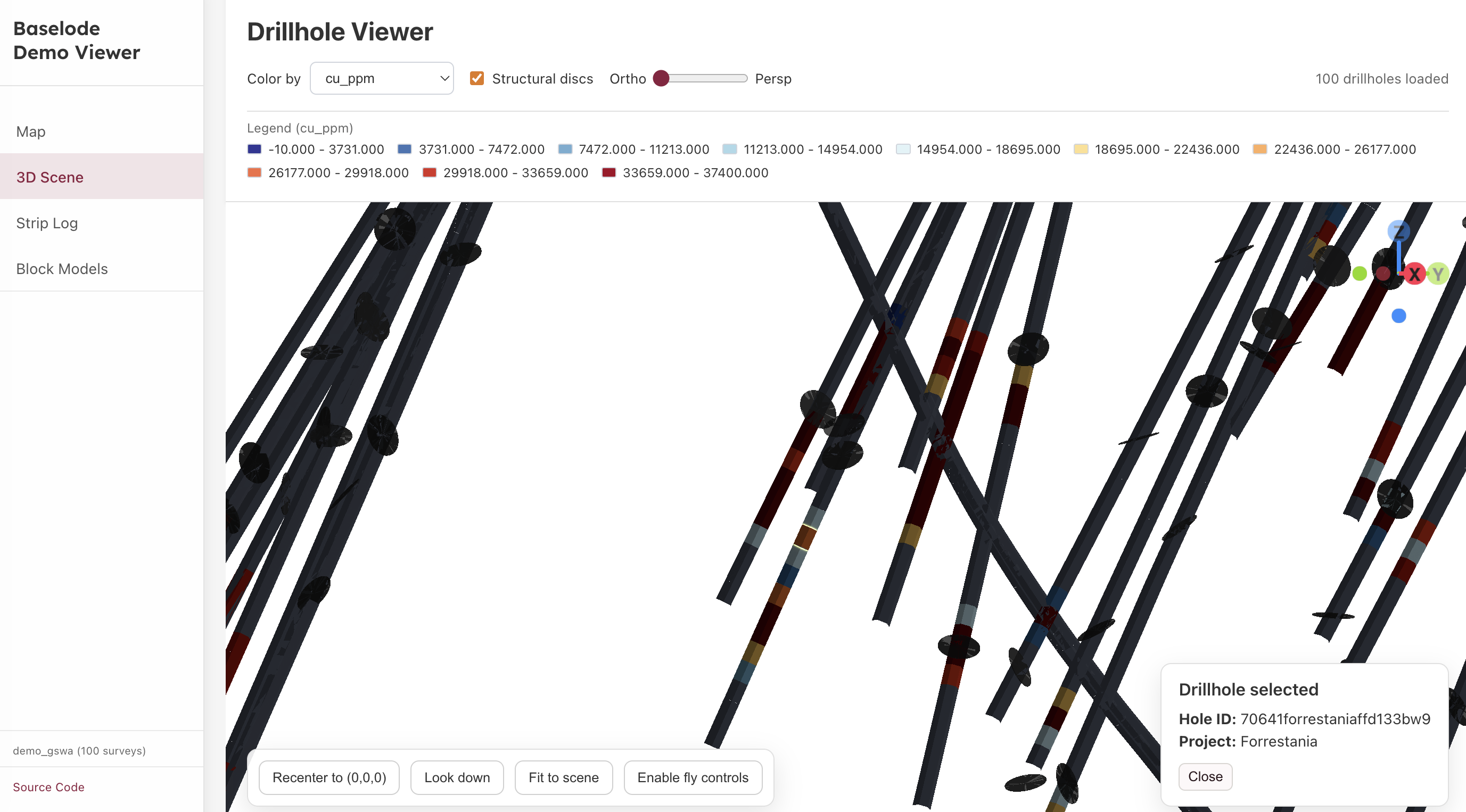
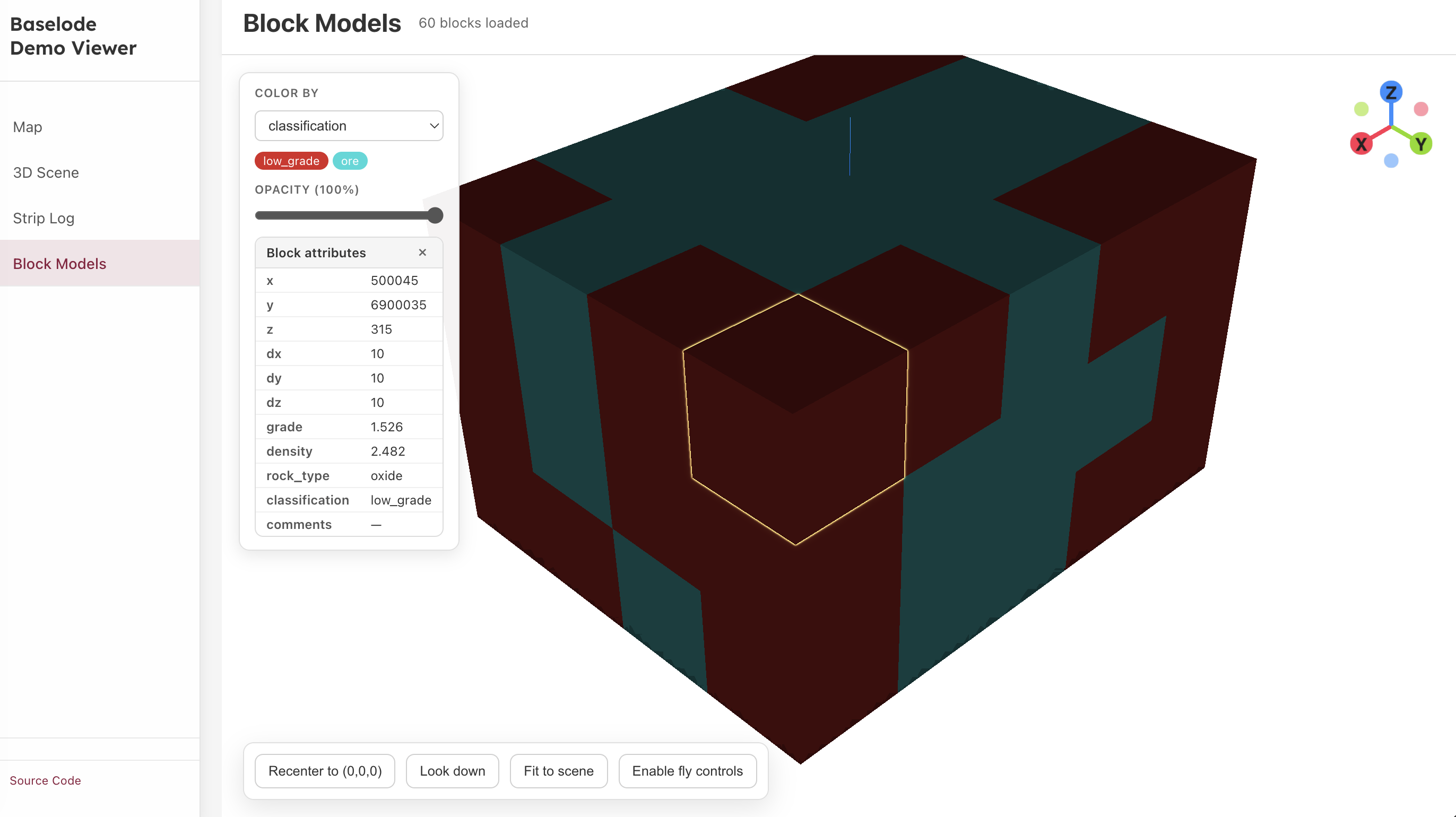
Baselode3DScene is a thin orchestrator that owns the WebGL context and delegates rendering to domain-specific modules (drillholeScene, blockModelScene, structuralScene). Use it directly or through the pre-built React wrapper.
import { Baselode3DScene } from 'baselode';

const scene = new Baselode3DScene();
scene.init(containerElement);   // attach to a DOM container

// Drillholes (desurveyed trace objects)
scene.setDrillholes(holes, { selectedAssayVariable: 'au_ppm', assayIntervalsByHole });

// Block model
scene.setBlocks(blockRows, 'au_ppm', stats);

// Structural discs
scene.setStructuralDiscs(structuralRows, holes, { radius: 5, opacity: 0.75 });

// Click handlers
scene.setDrillholeClickHandler(({ holeId }) => console.log(holeId));
scene.setBlockClickHandler((blockRow) => console.log(blockRow));

// Cleanup
scene.dispose();
React component — Baselode3DControls
Drop-in React component with orbit controls, a camera gizmo, and a controls panel:
import { Baselode3DControls } from 'baselode';
import 'baselode/style.css';

<Baselode3DControls
  traces={traces}
  structuralDiscs={discs}
  colorBy="au_ppm"
/>
React component — BlockModelWidget
Interactive 3D block model viewer:
import { BlockModelWidget } from 'baselode';
import 'baselode/style.css';

<BlockModelWidget
  blocks={blocks}
  colorProperty="grade"
/>
3D payload builders
import { tracesAsSegments, intervalsAsTubes, annotationsFromIntervals } from 'baselode';

const segments    = tracesAsSegments(traces);
const tubes       = intervalsAsTubes(assays, { colorBy: 'au_ppm', radius: 2 });
const annotations = annotationsFromIntervals(assays);
Structural disc builder
import { buildStructuralDiscs } from 'baselode';

const discs = buildStructuralDiscs(structuralPoints, traces);
// Returns Three.js-ready disc descriptors for each structural measurement
Polygonal grade blocks — 3D rendering
addGradeBlocksToScene renders each block as a THREE.Mesh with flat-shaded MeshStandardMaterial and an edge-highlight LineSegments child (hidden by default, shown on selection).
import { Baselode3DScene, loadGradeBlocksFromJson, addGradeBlocksToScene } from 'baselode';

const scene = new Baselode3DScene();
scene.init(containerElement);

const blockSet = loadGradeBlocksFromJson(json);
const group    = addGradeBlocksToScene(scene.scene, blockSet, { defaultOpacity: 0.85 });

// Register meshes so the built-in selection glow fires on click
scene.selectables = Array.from(group.children);
Click selection and edge highlight
When a mesh is clicked the scene's built-in raycast handler applies a glow outline (OutlinePass) around the outer silhouette. Each mesh also carries a hidden LineSegments child built from EdgesGeometry — showing it on selection highlights every polyhedral edge explicitly:
// Show/hide the edge overlay when selection changes
group.children.forEach((mesh) => {
  const edgeLines = mesh.children[0];
  if (edgeLines) edgeLines.visible = mesh.userData.id === selectedId;
});
mesh.userData contains { id, attributes } from the source JSON, available in the click callback.
Raster Overlays
A raster overlay drapes a georeferenced image (geology map, satellite photo, survey grid, etc.) as a flat plane in the 3D scene. The image is placed at a specified elevation and bounded to real-world coordinates so it aligns with drillhole traces.
Image format
Baselode3DScene uses Three.js's built-in TextureLoader, which supports formats the browser can decode natively: PNG, JPEG, WebP. GeoTIFF is not supported directly — convert it first:
# Using GDAL
gdal_translate -of PNG my_map_georeferenced.tif my_map.png
Coordinate system
Overlay bounds are expressed in the same local scene coordinate system as the drillhole traces (x = Easting offset, y = Northing offset, z = elevation in metres). If your traces are offset from a survey origin, subtract the same origin from the GeoTIFF corner coordinates:
// GeoTIFF corners in MGA zone 50 (metres):
//   Upper Left:  (693 545, 7 675 285)
//   Lower Right: (700 469, 7 667 027)
// Scene origin chosen as centroid of drillhole collars, e.g. (697 007, 7 671 156):

const ORIGIN_E = 697_007;
const ORIGIN_N = 7_671_156;

const bounds = {
  minX: 693_545 - ORIGIN_E,   // ≈ -3 462
  maxX: 700_469 - ORIGIN_E,   // ≈  3 462
  minY: 7_667_027 - ORIGIN_N, // ≈ -4 129
  maxY: 7_675_285 - ORIGIN_N, // ≈  4 129
};
Bounds can also be expressed as an origin + size object:
const bounds = { x: -3462, y: -4129, width: 6924, height: 8258 };Loading a raster overlay
import { createRasterOverlay } from 'baselode';

const layer = await createRasterOverlay({
  id: 'geology-map',          // unique identifier (auto-generated if omitted)
  name: 'Regional geology',   // display name
  source: { type: 'url', url: '/maps/geology.png' },
  bounds,                     // placement bounds in scene coordinates
  elevation: 350,             // Z position (metres above datum); default 0
  opacity: 0.85,              // initial opacity 0–1; default 1
  visible: true,              // initial visibility; default true
});

scene.addRasterOverlay(layer);
Loading from a browser File object
When the user uploads a file via <input type="file">:
const [file] = event.target.files;
const layer = await createRasterOverlay({
  source: { type: 'file', file },
  bounds,
  elevation: 350,
});
scene.addRasterOverlay(layer);
Supplying a pre-built Three.js texture
import * as THREE from 'three';

const texture = new THREE.TextureLoader().load('/maps/geology.png');
const layer = await createRasterOverlay({
  source: { type: 'texture', texture },
  bounds,
});
scene.addRasterOverlay(layer);
Runtime controls
Opacity, visibility, and elevation can be changed at any time without recreating the overlay:
scene.setRasterOverlayOpacity('geology-map', 0.5);
scene.setRasterOverlayVisibility('geology-map', false);
scene.setRasterOverlayElevation('geology-map', 400);  // shift Z
Listing and removing overlays
// Retrieve a layer by id
const layer = scene.getRasterOverlay('geology-map');

// List all active overlays
const layers = scene.listRasterOverlays();

// Remove one overlay and free its GPU resources
scene.removeRasterOverlay('geology-map');

// Remove all overlays
scene.clearRasterOverlays();
Complete example (React)
import { useEffect, useRef } from 'react';
import { Baselode3DScene, createRasterOverlay } from 'baselode';

const BOUNDS = { minX: -3462, maxX: 3462, minY: -4129, maxY: 4129 };

export default function MapScene({ holes }) {
  const containerRef = useRef(null);
  const sceneRef = useRef(null);

  useEffect(() => {
    const scene = new Baselode3DScene();
    scene.init(containerRef.current);
    sceneRef.current = scene;

    scene.setDrillholes(holes, { preserveView: false });

    createRasterOverlay({
      id: 'geology',
      source: { type: 'url', url: '/maps/geology.png' },
      bounds: BOUNDS,
      elevation: 350,
      opacity: 0.8,
    }).then((layer) => scene.addRasterOverlay(layer));

    const onResize = () => scene.resize();
    window.addEventListener('resize', onResize);
    return () => {
      window.removeEventListener('resize', onResize);
      scene.dispose();
    };
  }, []);

  return <div ref={containerRef} style={{ width: '100%', height: '100vh' }} />;
}
Camera Controls
Programmatic camera control helpers for the 3D scene:
import {
  fitCameraToBounds,
  recenterCameraToOrigin,
  lookDown,
  pan, dolly,
  setFov
} from 'baselode';

fitCameraToBounds(scene, bounds);
lookDown(scene);
setFov(scene, 45);
Standalone Bundle
For non-React environments (e.g. embedding in a plain HTML page or a Python Dash iframe), baselode ships a standalone UMD/IIFE module that registers itself as window.baselode:
<script src="baselode-module.js"></script>
<script>
  const scene = new window.baselode.Baselode3DScene(document.getElementById('canvas'));
</script>
The standalone bundle is built from vite.standalone.js in the JS package and is copied to demo-viewer-dash/assets/ automatically:
cd javascript/packages/baselode
npm run build:module